

Most organizations already run on Microsoft. Email, documents, meetings, identity, and often the data platform all sit inside the same ecosystem, so Copilot and the AI agents built around it are a natural next step. The pitch is compelling: agents that answer questions from company knowledge, draft and summarise, trigger workflows, and take action across your systems. The reality is more nuanced. Some integrations work smoothly almost out of the box. Others need real engineering, clean data, and careful governance before they deliver anything an executive would call value.
This blog separates the two so you can plan investments that will pay off and avoid the surprises that stall many AI Agents using Microsoft Copilot programs.
First, a Quick Map of The Landscape
“Copilot” is often used as a catch-all, but leaders should distinguish three layers:
- Microsoft 365 Copilot works inside tools your people already use, such as Outlook, Teams, Word, Excel, and SharePoint, and is grounded in the content they can access.
- Copilot Studio is the platform for building and extending agents, with tools, knowledge sources and workflows tailored to specific tasks.
- Azure and the wider Microsoft data and AI stack support custom-built agents where you need deeper control over models, data pipelines and architecture.
What integrates well, and what does not, depends heavily on which layer you are working in and how far your requirements stretch beyond Microsoft’s own products.
What Integrates Well
1. Microsoft 365 content and collaboration
The strongest fit is knowledge work inside the Microsoft estate. Agents can work with documents, emails, meetings and chats, helping people find information, summarise long threads and prepare first drafts. Because identity and permissions already live in Microsoft’s environment, access control can follow existing rules.
Executive takeaway: if your goal is productivity inside Microsoft 365, you can start quickly, provided your content is well organized.
2. Microsoft-native business applications
Agents tend to connect more easily to Microsoft’s own services, including Dynamics 365, Power Platform and Azure resources. Microsoft provides prebuilt connectors for several of these, which reduce the effort to give an agent useful capabilities, such as looking up a customer record or triggering an approval flow.
3. Well-documented SaaS and API-based systems
Copilot Studio offers a broad connector library, and it supports the Model Context Protocol (MCP), an open standard that lets agents call tools exposed by external servers. Microsoft’s documentation on extending agents with MCP explains how each tool published by an MCP server becomes available to the agent. At the time of writing, Copilot Studio supports MCP tools but not other MCP elements such as resources and prompts, so check current capabilities as the platform evolves.
If your core systems expose clean, modern APIs, connecting them is often straightforward.
4. Structured, repetitive workflows
Agents perform best where the task is bounded and the steps are clear: triaging service requests, answering policy questions, routing approvals, pulling data into a standard report. Narrow scope, defined inputs and a clear owner are the ingredients of early wins.
What Doesn’t Integrate as Easily
1. Legacy and on-premises systems
Older applications, custom-built internal systems, and on-premises databases are the most common stumbling blocks. They may lack APIs, use unusual data formats or sit behind network restrictions. Connecting an agent to them usually means building integration layers, middleware, or secure gateways first.
Executive takeaway: the agent is rarely the hard part. The hard part is the system it needs to talk to. This is why system integration and, in some cases, legacy system modernization often come before agent rollout, not after.
2. Messy or ungoverned data
An agent is only as reliable as the information it can reach. Duplicate documents, outdated files, inconsistent naming, and over-broad permissions all lead to poor answers and, worse, the risk of surfacing content to the wrong people. Many organizations discover permission and data-quality problems only when Copilot makes them visible.
Executive takeaway: tidy content and permissions before a broad rollout. It is one of the cheapest ways to improve results and reduce risk.
3. Complex, multi-step processes across many systems
A single agent that spans finance, operations, HR, and customer systems, with exceptions and approvals at each step, quickly moves beyond configuration into engineering. Reliability, error handling, auditing and human-in-the-loop checkpoints all need design.
For these cases, a custom AI agent is often a better fit than a lightly configured one, because you control orchestration, logging and fallback behavior.
4. Non-Microsoft ecosystems and niche applications
Copilot works well with Microsoft’s world and a growing set of third-party connectors. Industry-specific platforms, specialized ERPs, or line-of-business tools may require custom connectors, middleware, or bespoke APIs. Availability varies, so verify connector coverage for your specific stack early.
5. Strict governance, compliance, and data residency needs
Regulated sectors must be able to answer questions such as: what data did the agent access, what did it do, who approved it, and where is information processed? Out-of-the-box features help, but organizations with strict audit or residency requirements typically need additional design around logging, access controls, and approval flows.
6. Expectations of fully autonomous action
The more an agent can do, the more it can do wrong. Autonomous actions that change financial records, send external communications or alter customer data usually need guardrails, limits and human approval. Treating agents as capable assistants with supervised authority, rather than unsupervised decision-makers, is the safer and more realistic stance.
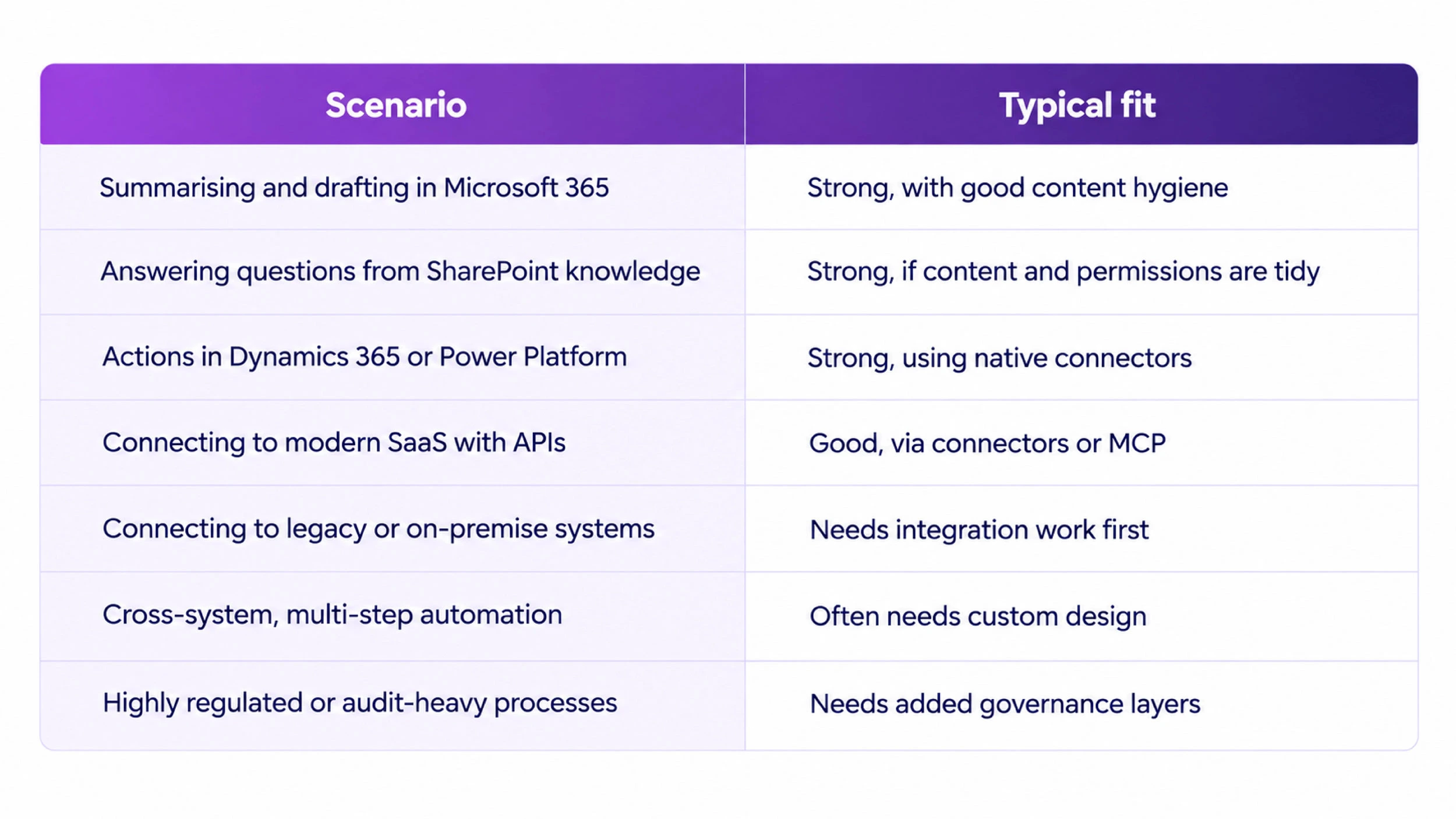
At a Glance
Practical Path For Executives
- Pick two or three use cases with a measurable outcome. Time saved in support, faster reporting, fewer manual approvals.
- Audit your data and permissions. Fix what agents will expose before they expose it.
- Map the systems each agent must touch. Note which have APIs, which need middleware and which are blockers.
- Start with a contained pilot. Prove value in one team, with human review built in.
- Build governance in from day one. Logging, access control, escalation paths and clear ownership.
- Decide where configuration ends and engineering begins. Use platform tools where they fit and custom development where they don’t.
- Measure and iterate. Track adoption, accuracy, and business impact, then expand.
Questions to Ask Before You Commit
- Which of our systems have usable APIs, and which do not?
- How clean and well-permissioned is the content an agent would draw on?
- What actions are we comfortable letting an agent take without approval?
- What audit trail do our regulators or auditors expect?
- Do we have the skills in-house to build, integrate, and support this, or do we need a partner?
Conclusion
Microsoft Copilot and Copilot Studio provide organizations with a faster path to useful AI agents, especially where work already happens within Microsoft’s ecosystem. They integrate well with Microsoft 365 content, Microsoft-native applications, and modern API-based systems. They integrate less easily with legacy platforms, messy data, complex cross-system processes, and strict compliance environments, and that is where most of the real effort and value lie.
The organizations that succeed are those that treat agents as part of a broader integration and data strategy, rather than a standalone product to switch on. That is where we can help. At iQuasar Software, we support companies across the full path: Microsoft Copilot consulting to identify where Copilot fits, AI integration services to connect agents to your existing systems, and custom AI agent development when your processes need more than configuration can offer.
Planning your next step with Copilot and AI agents? Talk to the iQuasar team about where integration will be smooth, where it will need work, and how to sequence it for the best return.
Microsoft’s products, connectors, and licensing change frequently. Confirm the current capabilities in Microsoft’s documentation and with your implementation partner before making decisions.