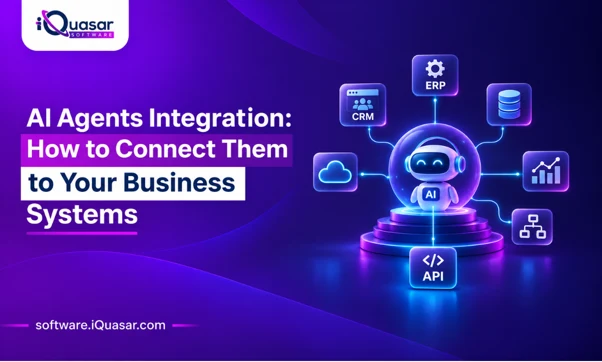
AI agents create business value only when they can read from and act on your systems of record. A model that cannot reach your ERP, CRM, ticketing, or document stores is a chatbot. A model that can reach them without controls is a risk. AI agents integration is the discipline of closing that gap safely: giving agents scoped, auditable access to the tools and data they need to finish real work.
Three decisions shape the outcome:
- How agents call your systems: direct API tool calling, the Model Context Protocol (MCP), an iPaaS layer, event-driven triggers, or UI automation as a last resort.
- What agents are allowed to do: identity, least-privilege permissions, and human approval for consequential actions.
- How you prove it works: logging, evaluation, and metrics tied to hours saved and cycle time reduced.
Most organizations succeed with a layered approach: a thin, governed tool layer over existing APIs, read-only access first, approvals on writes, and full traceability. iQuasar’s AI agent development services are built around exactly this model.
2. Why AI Agents Integration Decides ROI
2.1 Why Pilots Stall
Most AI pilots do not fail on model quality. They stall at the integration boundary: no safe way to reach production data, unclear ownership of permissions, no audit trail, and no measurement of impact. A demo that works on pasted text rarely survives contact with real authentication, rate limits, messy records, and compliance review.
2.2 What Changes When Agents Act
A search assistant reads. An agent plans, calls tools, and changes state: it creates a purchase requisition, updates an opportunity, or closes a ticket. That shift raises the bar on three fronts:
- Reliability: tool calls must be validated, idempotent, and safe to retry.
- Security: the agent becomes a new kind of privileged user that can be manipulated through the content it reads.
- Accountability: every action needs an owner, a log entry, and a way to reverse it.
3. What AI Agents Integration Means
3.1 Agent vs. Chatbot vs. Traditional Automation
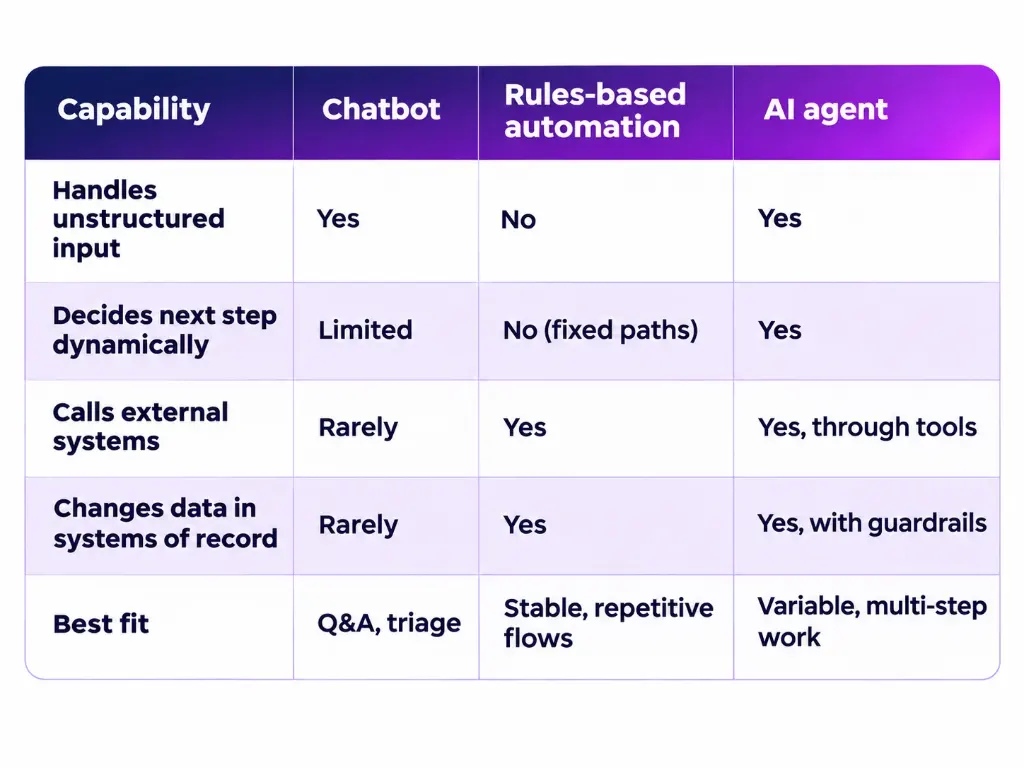
3.2 The Four Building Blocks
Every production agent combines four parts, and integration touches all of them:
- Model: the reasoning engine that interprets goals and chooses actions.
- Tools: functions the agent can call, such as “create_invoice” or “search_customer”. This is where integration lives.
- Context and memory: the data the agent retrieves (documents, records, history) to ground its decisions.
- Orchestration and guardrails: the logic that sequences steps, enforces policy, and pauses for approval.
4. Integration Patterns Compared
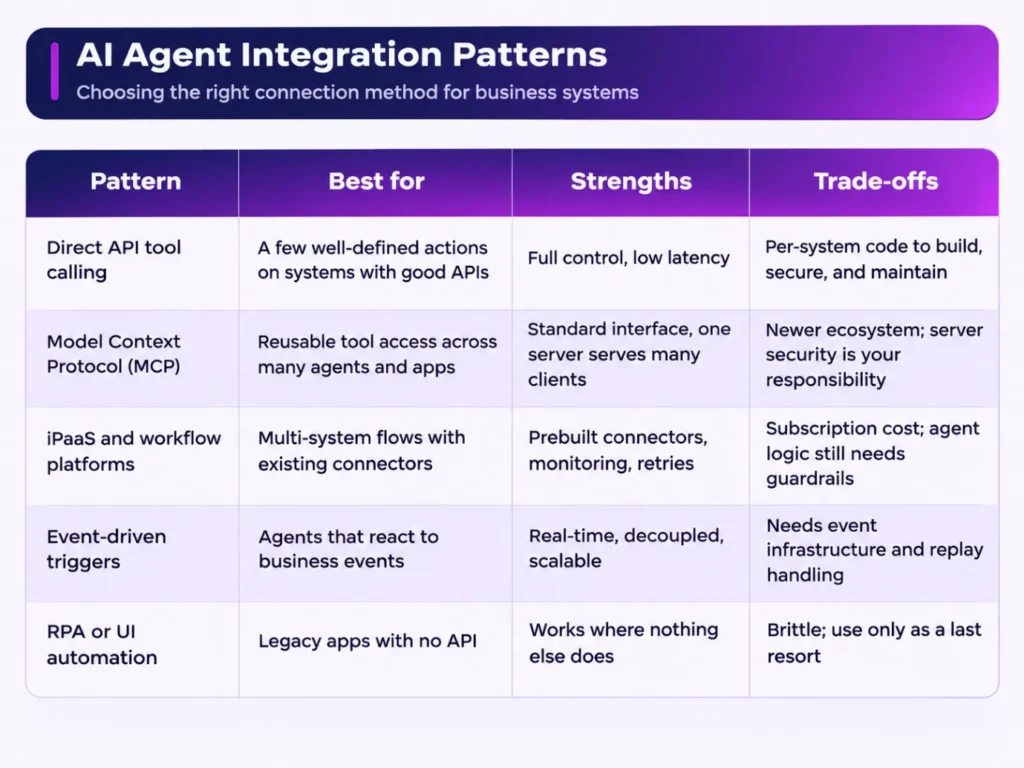
4.1 Direct API Tool Calling
The model emits a structured request (a function name and arguments), and your application validates and executes it against the target API. Describe each tool with a strict schema; OpenAPI definitions are a practical starting point because they already document endpoints, parameters, and responses. Wrap raw APIs in task-level tools (“create_sales_order”) rather than exposing dozens of low-level endpoints, which confuses the model and widens the attack surface.
4.2 Model Context Protocol (MCP)
MCP is an open protocol that standardizes how AI applications connect to external tools and data. Per the MCP specification, it uses a JSON-RPC message format, and servers can expose resources (data), prompts (templates), and tools (functions the model can execute). The business benefit is reuse: build one MCP server for your ERP and let multiple agents and clients use it. The security burden stays with you, because MCP servers provide access to data and code execution paths that must be authenticated, authorized, and monitored.
4.3 iPaaS and Workflow Platforms
If you already run an integration platform, let it do what it does well: connectivity, transformation, queuing, and retries. The agent decides what to do; the workflow engine handles how it reaches each system. This is especially effective when your landscape includes many SaaS applications and you need centralized monitoring.
4.4 Event-Driven Integration
Publish business events (order created, invoice overdue, ticket escalated) to a message bus and let agents subscribe. This avoids polling, supports real-time responses, and decouples agents from source systems. Design for at-least-once delivery: consumers must be idempotent, and each event should carry a unique ID so retries never duplicate an action.
4.5 RPA and UI Automation as a Last Resort
When a legacy system has no usable API, UI automation can bridge the gap. Treat it as a stopgap and plan modernization; screen-driven flows break when interfaces change and are harder to audit.
5. Connecting Agents to Core Business Systems
5.1 ERP and Finance
ERP data is high-value and high-risk. Start with read-only tools (balances, open orders, vendor lookups), then add narrowly scoped writes such as draft journal entries or purchase requisitions that require approval. Respect platform limits: most ERPs enforce API concurrency and governance caps, so queue agent traffic rather than letting it compete with core processes. iQuasar supports this work through its NetSuite services, including integrations and custom SuiteScript development.
5.2 CRM and Customer Data
Agents can enrich leads, summarize account history, and update opportunity fields. Enforce field-level permissions and avoid giving an agent bulk-export capability. Return only the records and fields the task needs.
5.3 Productivity Suites
Email, documents, calendars, and spreadsheets hold much of the context agents need. If your teams already pay for Microsoft Copilot or Google Gemini, the fastest path is often to embed governed agents in workflows you already own. See iQuasar’s Microsoft Copilot consulting and Google Workspace AI integration offerings.
5.4 Knowledge Bases and Data Platforms
Ground agents with retrieval over approved sources (policies, product documentation, contracts) and keep access controls intact at retrieval time, so a user’s agent only sees what that user could open. For analytics, give agents parameterized, read-only queries instead of free-form SQL against production databases.
5.5 Ticketing, ITSM, and HR Systems
These are strong early candidates: workflows are well-defined, outcomes are measurable, and actions (assign, categorize, draft a response, escalate) are low-risk and reversible.
6. Security, Identity, and Governance
6.1 Identity and Least Privilege
Give every agent its own identity. Use OAuth 2.0 with short-lived, narrowly scoped tokens rather than shared passwords or long-lived API keys, and keep secrets in a vault. Where an agent acts for a person, use delegated access so it can never exceed that person’s permissions.
6.2 Prompt Injection and Excessive Agency
Agents read untrusted content: emails, web pages, uploaded files. Hidden instructions in that content can steer the agent. The OWASP Top 10 for LLM Applications identifies prompt injection and excessive agency (too much functionality, permission, or autonomy) among the leading risks. Mitigations that work in practice:
- Expose only the tools a task needs, with the minimum permissions.
- Treat model output as untrusted input: validate every tool argument against a schema before executing.
- Separate read tools from write tools, and require approval for destructive or financial actions.
- Never let retrieved content change the agent’s instructions or tool permissions.
6.3 Human-in-the-Loop Approvals
Use a tiered model. Low-risk, reversible actions run automatically; medium-risk actions run with post-hoc review; high-risk actions (payments, deletions, external communications) require explicit human approval. Review thresholds can relax as measured accuracy improves.
6.4 Risk Management Framework
Anchor governance in a recognized framework. The NIST AI Risk Management Framework organizes AI risk work into four functions (govern, map, measure, manage) and is intended for voluntary use across sectors. Mapping your agent program to it gives security, legal, and audit teams a shared vocabulary.
6.5 Audit Trails and Observability
Log every prompt, tool call, argument, result, and approval with a correlation ID. Standard tracing practices apply; OpenTelemetry is a vendor-neutral way to instrument agent workflows alongside the rest of your stack. You should be able to answer “who or what did this, why, and with what data?” for any action.
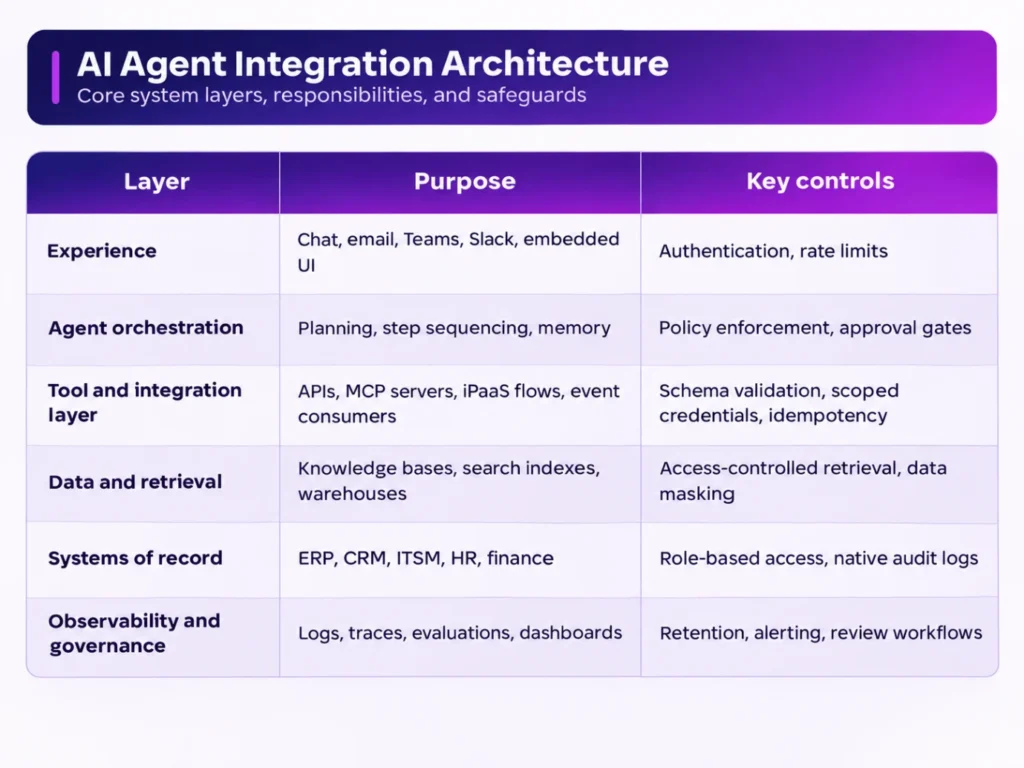
7. Reference Architecture
7.1 The Layered Model
7.2 Design Principles
- One gateway for tools. Route all agent actions through a single, governed layer so policy and logging live in one place.
- Idempotency by default. Use request IDs so a retried call never creates a duplicate record.
- Fail safe. On ambiguity or error, the agent should stop and escalate rather than guess.
- Separate environments. Test against sandboxes with realistic but non-production data.
8. Implementation Roadmap
8.1 Assess (Weeks 0–1)
Identify three to five high-impact, well-bounded workflows. Score them on business value, data readiness, integration complexity, and risk. Confirm system owners, API availability, and permission models. iQuasar’s AI Readiness Assessment is designed to produce this shortlist and a clear pilot plan.
8.2 Pilot (Weeks 1–4)
Build one workflow end-to-end with read-only access first, then add scoped writes behind approvals. Instrument everything from day one and capture a before-and-after baseline for the metrics you chose.
8.3 Harden (Weeks 4–8)
Add evaluation sets drawn from real cases, regression tests for prompts and tools, rate-limit handling, alerting, and an incident runbook. Complete the security and compliance review with the audit trail in hand.
8.4 Scale (Ongoing)
Reuse the tool layer for adjacent workflows, expand to more systems, and review autonomy thresholds quarterly based on measured accuracy and exception rates.
9. AI Agents Integration Best Practices
- Start with read-only, then earn write access.
- Design tools around tasks, not endpoints. Fewer, clearer tools improve accuracy and security.
- Validate everything. Schema-check arguments before execution and responses before use.
- Handle failure explicitly. Timeouts, rate limits, and partial failures require defined behavior and backoff strategies.
- Keep humans in the loop for consequential actions.
- Evaluate continuously. Maintain test sets and re-run them whenever prompts, models, or tools change.
- Control cost and latency. Cap tool-call loops, cache stable lookups, and set token budgets.
- Version your tools and prompts. Treat them as code with review and rollback.
- Plan for model change. Keep the integration layer model-agnostic so you can switch providers without rebuilding.
10. Common Pitfalls to Avoid
- Over-privileged service accounts: one admin token shared by every agent.
- Exposing raw APIs as tools: too many options, too much power.
- No audit trail: actions that cannot be explained or reversed.
- Skipping evaluation: quality drifts silently after a model or prompt update.
- Ignoring system limits: agents that flood ERP or CRM APIs and trigger throttling.
- Shadow AI: employees using unmanaged tools because sanctioned ones are not integrated.
- Pilot without a production path: no plan for security review, ownership, or support.
11. Measuring Success
Tie every deployment to business outcomes, not model metrics alone:
- Hours of manual work returned per week
- Cycle time for the target process (for example, order to cash, ticket to resolution)
- Task completion rate without human correction
- Exception and escalation rate
- Error or rework rate versus the pre-agent baseline
- Cost per completed task, including model and integration costs
- Adoption by the intended users
12. Frequently Asked Questions About AI Agents Integration
Q1. What is AI agents integration?
AI agents integration is the process of connecting AI agents to business systems such as ERP, CRM, ticketing, email, and data platforms so they can retrieve information and take actions securely. It includes tool design, authentication, permissions, orchestration, and monitoring.
Q2. How do AI agents connect to business systems?
Common methods are direct API tool calling, the Model Context Protocol (MCP), iPaaS or workflow platforms, event-driven triggers, and, as a last resort, UI automation. Most production deployments combine several of these behind a single governed tool layer.
Q3. What is the Model Context Protocol (MCP)?
MCP is an open protocol that standardizes how AI applications connect to external tools and data sources. Servers can expose data, prompt templates, and callable tools, so one integration can serve many agents. See the official specification.
Q4. Should I use MCP, direct APIs, or an iPaaS?
Use direct APIs for a few well-defined actions, MCP when you want reusable tool access across multiple agents and applications, and an iPaaS when you need prebuilt connectors, transformation, and centralized monitoring across many systems. They are complementary, not mutually exclusive.
Q5. Is it safe to give AI agents access to company data?
Yes, if access is designed carefully: separate agent identities, least-privilege scopes, short-lived tokens, input validation, human approval for high-risk actions, and full audit logging. The OWASP Top 10 for LLM Applications is a useful checklist of risks to address.
Q6. What is prompt injection, and how do I defend against it?
Prompt injection is when instructions hidden in content an agent reads (an email, web page, or file) manipulate its behavior. Defenses include limiting tool permissions, validating all tool arguments, separating read and write capabilities, requiring approvals for sensitive actions, and never letting retrieved content alter agent instructions.
Q7. Do AI agents need human approval?
For consequential actions such as payments, deletions, or external communications, yes. A tiered approach works well: automate low-risk reversible actions, review medium-risk ones after the fact, and require approval for high-risk ones.
Q8. Can AI agents work with legacy systems that have no API?
Yes, through database-level integration, file exchange, or UI automation, but these approaches are more brittle. Use them as stopgaps and plan API-based modernization where possible. iQuasar also offers legacy system modernization.
Q9. How long does an AI agents integration take?
A focused pilot on one workflow can often be live in a few weeks. iQuasar reports pilots deployed in two to four weeks. Hardening, security review, and scaling to more systems typically take additional weeks to months depending on complexity.
Q10. How do I measure the ROI of AI agents?
Baseline the target workflow before launch, then track hours saved, cycle time, task completion without correction, error rate, and cost per task. Tie results to a business metric rather than model accuracy alone.
Q11. Do we need new software to start?
Usually not. Many organizations can build inside their existing Microsoft 365, Google Workspace, and connected systems, adding a governed integration layer where needed.
Q12. Which framework should guide AI governance?
The NIST AI Risk Management Framework is a widely used, voluntary starting point. Pair it with your existing security and compliance policies, and align agent controls to it.
Q13. How can iQuasar help with AI agents integration?
iQuasar designs, integrates, and deploys secure AI agents across your stack, starting with an AI Readiness Assessment. Talk to the team or explore the AI agent development services. Ready to connect AI agents to your business systems? Book a free consultation with iQuasar and map your first production workflow.