Enterprise security is no longer defined by how effectively an organization protects its network perimeter. It is defined by how consistently it verifies identities, evaluates device health, controls access to sensitive information, and responds to threats across an increasingly distributed digital environment. As enterprises expand hybrid work, cloud collaboration, and AI adoption, managing these security functions independently creates operational gaps. An employee may authenticate successfully from a compromised device. A properly secured endpoint may still expose confidential information through excessive permissions. And disconnected security tools can leave incident response teams without the context needed to quickly contain an attack.
Microsoft Modern Work and Security addresses these challenges by integrating identity, endpoint, and data protection into a Zero Trust security architecture.
For CIOs and CISOs, the strategic question is not whether these technologies are deployed. It is whether they operate together to enforce consistent security policies without compromising business productivity.
What Is Microsoft Modern Work and Security?
Microsoft Modern Work and Security refers to an integrated approach that combines Microsoft 365 productivity and collaboration capabilities with identity management, endpoint protection, information governance, and threat detection. Rather than treating security as an independent control layer, the approach embeds protection into how employees access applications, collaborate, manage devices, and interact with enterprise information.
Its core capabilities include:
- Identity security: Microsoft Entra ID manages authentication, access policies, and identity-related risk.
- Endpoint security: Microsoft Intune and Microsoft Defender for Endpoint help manage device compliance, detect threats, and protect endpoints.
- Data security: Microsoft Purview supports information classification, sensitivity labeling, and data loss prevention.
- Threat detection and response: Microsoft Defender XDR correlates security signals across identities, devices, email, and applications.
- Secure collaboration: Microsoft 365 provides the productivity environment in which these controls can be applied across supported workloads.
The underlying security model follows Zero Trust principles: verify explicitly, use least-privilege access, and assume breach. According to Microsoft’s security platform architecture documentation, its security services exchange signals and context to coordinate access decisions, policy enforcement, threat detection, and response across enterprise environments.
The strategic value comes from this integration. Identity risk can influence access decisions, endpoint health can determine whether a device should connect to corporate resources, and data protection policies can govern how sensitive information is used after access has been granted.
How Does Microsoft Integrate Identity, Endpoint, and Data Security?
Microsoft connects these security domains through shared signals, policy-based controls, and coordinated threat response. Each layer performs a distinct function, but the effectiveness of the architecture depends on how the layers interact.
1. Identity Security: Establishing Trust Before Granting Access
Identity has become a primary security control point in modern enterprise environments. Employees access business applications from multiple devices and locations, while contractors, partners, and automated workloads introduce additional identities requiring governance. Microsoft Entra ID provides centralized identity and access management for Microsoft 365 and integrated enterprise applications.
Its security capabilities include:
- Multifactor authentication (MFA): Adds verification requirements beyond passwords, including phishing-resistant authentication methods.
- Conditional Access: Evaluates access requests against policies involving user identity, device compliance, location, application, and supported risk signals.
- Identity Protection: Helps identify risky users and sign-ins based on available identity risk signals.
- Privileged Identity Management (PIM): Supports time-bound, controlled access to privileged roles when appropriately licensed and configured.
Consider an employee attempting to access SharePoint from an unfamiliar device. Instead of granting access solely based on valid credentials, Microsoft Entra Conditional Access can require additional authentication or assess whether the device meets organizational compliance requirements. If those requirements are not met, the access request may be blocked or restricted according to policy. This introduces an important shift: access becomes conditional on the security context, not simply the validity of a username and password.
However, identity verification alone cannot establish whether the device being used is secure. That requires integration with endpoint management and threat protection.
2. Endpoint Security: Extending Trust Decisions to Device Health
Every laptop, workstation, and mobile device accessing enterprise resources represents a potential security exposure. Even when a user is legitimate, an unmanaged, outdated, or compromised endpoint can introduce threats into the environment. Microsoft addresses endpoint risk through two complementary capabilities.
- Microsoft Intune manages device configuration, security settings, and compliance policies. Organizations can establish requirements for operating system versions, encryption, configuration standards, and other device security conditions.
- Microsoft Defender for Endpoint provides endpoint detection and response, vulnerability visibility, and threat protection capabilities.
When integrated, these services allow endpoint risk to influence identity-based access decisions.
For example:
1. An employee signs in to Microsoft 365 from a managed laptop.
2. Microsoft Entra ID evaluates the applicable Conditional Access policies.
3. Intune provides the device’s compliance status.
4. Defender for Endpoint detects malicious activity and reports an elevated device risk level.
5. Intune evaluates that risk against the organization’s compliance policy.
6. If the device becomes noncompliant, Conditional Access can prevent access to protected resources.
This illustrates how endpoint security moves beyond device monitoring to become an active component of access governance. The outcome is a more adaptive security posture in which device trust can change as new threats emerge. Microsoft’s Zero Trust deployment guidance for Intune describes how device compliance, endpoint risk monitoring, and Conditional Access can work together to protect organizational resources.
For enterprise IT leaders, operational considerations are equally important. These controls require coordinated policy ownership between identity, endpoint management, and security operations teams. Poorly aligned policies can create unnecessary access restrictions or leave critical exceptions unmanaged.
3. Data Security: Protecting Information Beyond Authentication
Identity and endpoint controls determine who can access enterprise systems and under what conditions. They do not, by themselves, determine how sensitive information should be handled once access is granted. This is where Microsoft Purview becomes critical. Microsoft Purview helps organizations discover, classify, label, and protect sensitive information across supported Microsoft 365 services, endpoints, and other integrated environments.
Its relevant capabilities include:
- Sensitivity labels: Classify and apply protection settings to business information according to organizational policies.
- Data Loss Prevention (DLP): Detect and control specified activities involving sensitive information.
- Endpoint DLP: Monitor or restrict supported actions such as copying sensitive files to removable storage, printing, or uploading to restricted destinations.
- Insider Risk Management: Help identify potentially risky activities involving organizational information.
- Audit and compliance capabilities: Support visibility, investigation, and regulatory governance requirements.
Consider a financial services organization handling confidential customer records. An authorized employee may legitimately access a document through SharePoint. However, organizational policy may prohibit transferring the information to an unauthorized cloud storage service. With appropriate classification and DLP policies, Microsoft Purview can identify sensitive information and restrict certain transfer activities. This is the distinction between access security and data security.
An authorized user does not necessarily have unrestricted authority to distribute the information they can access.
For CIOs and CISOs, effective data protection requires more than enabling DLP policies. It demands a consistent information classification strategy, clear ownership of sensitive data, and defined rules for legitimate business use.
How Do These Security Layers Work Together in a Zero Trust Architecture?
The value of Microsoft Modern Work and Security becomes most apparent when identity, endpoint, and data signals are evaluated together. Consider a practical enterprise scenario. A project manager working remotely attempts to access a confidential client document from a corporate laptop.
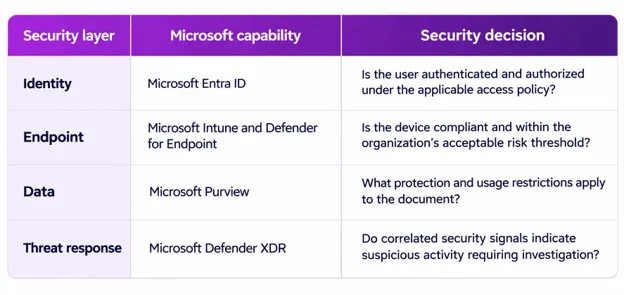
If the user is authenticated and the device meets compliance requirements, access may be permitted. Once the document is opened, sensitivity labels and DLP policies can continue protecting the information according to its classification. If Defender for Endpoint subsequently identifies malicious activity, the device risk signal can affect its compliance status and, consequently, future access decisions. Meanwhile, Defender XDR can correlate relevant security alerts to help analysts understand the broader incident. The important distinction is that Microsoft does not simply place multiple security products side by side. It enables coordinated security decisions across different layers of the environment.
However, these integrations are not universally automatic. Their behavior depends on licensing, supported workloads, integrations, and the organization’s configuration choices.
Why Does Integrated Microsoft Security Matter to CIOs and CISOs?
The strategic relevance of Microsoft Modern Work and Security extends beyond the implementation of technical controls. For enterprise leadership, it creates an opportunity to improve security governance, operational efficiency, and technology investment decisions.
- Reduce Security Fragmentation
Organizations often accumulate overlapping tools for authentication, device management, threat protection, and information security. Disjointed systems can create inconsistent policies and complicate investigations. Integrating compatible Microsoft capabilities can reduce operational fragmentation and improve visibility into security events across the environment. However, consolidation should follow a capability assessment rather than an assumption that one platform replaces every specialized security tool.
- Improve Threat Detection and Incident Response
A compromised identity, suspicious endpoint process, and malicious email may be connected elements of the same attack. When these events remain isolated in separate systems, security teams must manually reconstruct the incident. Microsoft Defender XDR can correlate supported signals into incidents, giving analysts a broader view of attacker activity.
This can improve investigation efficiency, especially when organizations establish clear response procedures and appropriate automation.
- Support Security Without Disrupting Productivity
Security controls that introduce unnecessary friction may encourage workarounds. A coordinated approach allows organizations to apply more context-sensitive policies. For example, a compliant corporate device may receive a different access experience from an unmanaged personal device.
The objective is not to eliminate authentication or security checks. It is to apply the appropriate controls to the relevant level of risk.
- Strengthen Governance for AI Adoption
As organizations introduce Microsoft 365 Copilot and other AI-enabled workflows, existing permissions and data governance practices become increasingly consequential. Information that is broadly accessible within an organization may also be discoverable through authorized AI-assisted workflows. Therefore, AI readiness should include reviewing SharePoint permissions, reducing oversharing, validating sensitivity labels, and establishing data governance controls.
For leadership teams, this means security and information governance must be foundational components of enterprise AI strategy, not activities postponed until after deployment.
What Should Enterprises Prioritize When Implementing Microsoft Modern Work and Security?
A successful implementation requires an architectural roadmap that accounts for existing systems, organizational risk, and business requirements.
Phase 1: Assess the Current Security Environment
Begin by reviewing identity configurations, endpoint inventories, existing security controls, Microsoft licensing, and information governance maturity. Identify unmanaged devices, excessive privileges, inconsistent MFA coverage, and areas where sensitive data lacks appropriate classification. This establishes the baseline for a prioritized security roadmap.
Phase 2: Strengthen Identity and Device Controls
Implement risk-appropriate authentication controls, review privileged access, and establish Conditional Access policies. At the endpoint layer, define device compliance standards, security baselines, and threat monitoring requirements. Introduce access restrictions in controlled phases, using testing and exception management to minimize business disruption.
Phase 3: Establish Data Protection and Governance
Identify critical information categories and determine which require sensitivity labels, encryption, or DLP controls. Review collaboration permissions across Teams, SharePoint, and OneDrive. Start with monitoring and, where appropriate, policy validation before introducing restrictive enforcement.
Phase 4: Integrate Security Monitoring and Response
Connect supported identity, endpoint, and application signals into Microsoft Defender XDR. Establish incident ownership, investigation workflows, escalation procedures, and response automation where justified. Organizations with broader SIEM requirements may also evaluate Microsoft Sentinel for cross-platform monitoring and security orchestration.
Phase 5: Measure and Optimize Security Performance
Security architecture should be evaluated continuously. Executive dashboards should monitor indicators such as:
- MFA and phishing-resistant authentication coverage
- Percentage of managed and compliant endpoints
- Number of high-risk identities and devices
- Critical security exposure remediation times
- Mean time to detect and respond to incidents
- Sensitive data policy violations and recurring exceptions
- Licensing utilization and security control adoption
These measurements help translate technical security performance into operational and governance outcomes.
Integrating identity, endpoint, and data protection requires more than provisioning Microsoft licenses. Organizations must align technology configuration with business processes, user access requirements, information governance, and ongoing operational responsibilities. iQuasar Software provides Microsoft implementation and optimization services spanning modern workplace deployment, security configuration, device management, and ongoing support. For organizations already invested in Microsoft technologies, the starting point can be an assessment of existing capabilities, licensing utilization, security gaps, and configuration maturity. For businesses transitioning from legacy infrastructure or disconnected collaboration platforms, the focus may involve establishing a secure Microsoft 365 foundation before introducing more advanced governance and automation capabilities.
Explore iQuasar Software’s Microsoft Solutions Partner services to understand how an integrated implementation approach can support your organization’s security and modernization priorities.
Frequently Asked Questions (FAQs)
1. What is Microsoft Modern Work and Security?
Microsoft Modern Work and Security is an integrated approach to enterprise productivity and cybersecurity that combines Microsoft 365 collaboration tools with identity protection, endpoint management, data security, and threat detection. It supports Zero Trust principles through coordinated access controls and security monitoring.
2. How does Microsoft Modern Work and Security integrate identity and endpoint security?
Microsoft Entra ID uses Conditional Access policies to evaluate access requests, while Microsoft Intune provides device compliance information. Microsoft Defender for Endpoint can supply device risk signals to Intune, allowing organizations to restrict access when endpoints fail configured security requirements.
3. What Microsoft tools are used for identity, endpoint, and data protection?
Microsoft Entra ID manages identity and access. Microsoft Intune manages endpoint configuration and compliance, while Microsoft Defender for Endpoint provides threat protection. Microsoft Purview supports information classification and data loss prevention. Microsoft Defender XDR helps correlate security incidents across supported services.
4. How does Microsoft Modern Work and Security support Zero Trust?
It supports Zero Trust by verifying identities, evaluating device security, enforcing least-privilege access, protecting sensitive information, and continuously monitoring threats. The effectiveness of these controls depends on their configuration, integration, and ongoing governance.
5. What is the difference between Microsoft Intune and Microsoft Defender for Endpoint?
Microsoft Intune primarily focuses on device management, configuration, and compliance. Microsoft Defender for Endpoint focuses on identifying, investigating, and responding to endpoint threats. Together, they can help organizations use endpoint risk as a factor in access control decisions.
6. Can Microsoft Purview prevent sensitive data from leaving an organization?
Microsoft Purview Data Loss Prevention can detect and restrict configured activities involving sensitive information across supported applications, services, and endpoints. Its effectiveness depends on data classification, policy configuration, licensing, and workload coverage. It does not guarantee the prevention of every possible data exfiltration scenario.
7. How should enterprises begin implementing Microsoft Modern Work and Security?
Enterprises should begin with an assessment of their existing Microsoft environment, identity security, endpoint compliance, sensitive data exposure, and licensing. They can then prioritize authentication controls, device protection, information governance, threat monitoring, and continuous optimization based on business risk.