NetSuite rarely runs alone. CRM, eCommerce, payroll, banking, tax, warehouse, procurement, and BI platforms all need clean, timely data from the ERP, and the ERP needs data back from them. The quality of your NetSuite integration strategy directly determines close speed, data trust, and how quickly you can onboard acquisitions, channels, or new
business models.
There are three broad ways to connect NetSuite to the rest of your stack:
1. Native APIs and scripting (SuiteTalk REST, SuiteTalk SOAP, RESTlets, SuiteQL): maximum control, maximum engineering ownership.
2. Prebuilt connectors (packaged SuiteApps and vendor-built connectors): fastest time to value for well-defined, common use cases.
3. iPaaS platforms (Celigo, Boomi, MuleSoft, Workato, Jitterbit, Oracle Integration, and others): managed orchestration, monitoring, and reuse across many systems.
Most mature organizations land on a hybrid: prebuilt connectors for commodity flows, an iPaaS for orchestration and governance, and custom API work only where the business logic is genuinely unique.
2. Why NetSuite Integration Strategy Matters at the Executive Level
Integration is often treated as a project-level technical task. In practice, it is a portfolio-level risk and value lever:
- Financial accuracy: Broken or delayed order-to-cash and procure-to-pay syncs create reconciliation work and audit exposure.
- Speed of change: Every new sales channel, acquisition, or 3PL adds integration demand. Point-to-point sprawl slows all of it.
- Total cost of ownership: Custom scripts are cheap to write and expensive to own. Staff turnover turns undocumented integrations into operational risk.
- Platform dependency: NetSuite releases twice a year. Integrations built on deprecated interfaces fail on someone else’s schedule.
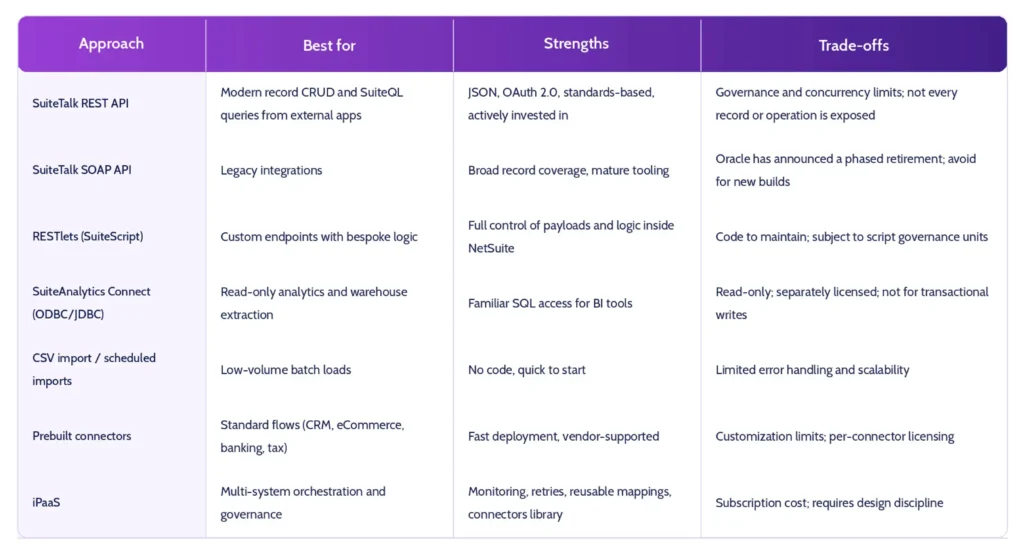
3. The NetSuite Integration Landscape at a Glance
4. NetSuite APIs Explained
4.1 SuiteTalk REST Web Services
SuiteTalk REST is the strategic API for new NetSuite integration work. It exposes a record service for create, read, update, and delete operations over JSON, and supports SuiteQL, a SQL-like query language that lets you retrieve joined data in a single call rather than chaining many record requests. Key technical considerations:
- Authentication: OAuth 2.0 is the recommended approach, including the client- credentials style machine-to-machine flow using certificates. Token-based authentication (TBA) remains widely used. Avoid user-credential authentication.
- Concurrency and rate limits: NetSuite enforces account-level concurrency limits that depend on your service tier and SuiteCloud Plus licensing. Design for 429-style throttling responses with exponential backoff.
- Pagination and payload size: Use limits and offsets deliberately. Large SuiteQL result sets should be paged and filtered by last-modified date for incremental sync.
- Metadata: Use the metadata catalog to discover record schemas rather than hard- coding assumptions.
4.2 SuiteTalk SOAP Web Services
SOAP has historically offered the broadest coverage of records and operations and is embedded in many existing connectors and middleware flows. Oracle has communicated a phased deprecation of SOAP, so any new NetSuite API project should default to REST, and existing SOAP integrations should be inventoried and given a migration plan. Per Oracle’s SOAP Removal Plans FAQ, new SOAP integrations can no longer be built from the 2027.1 release, and Oracle’s WSDL support documentation states that SOAP will be removed entirely in the 2028.2 release. Confirm the current timeline in Oracle’s documentation, as dates and endpoint versions are updated periodically.
4.3 RESTlets and SuiteScript
RESTlets are custom HTTP endpoints written in SuiteScript 2.x and hosted inside NetSuite. They are the right tool when you need to:
- Execute multi-step logic in a single call (for example, create a sales order, apply a payment, and fulfill atomically).
- Return a purpose-built payload instead of raw record structures.
- Enforce validation inside NetSuite before data is committed. The cost is ownership. RESTlets consume script governance units, require code review and deployment discipline (SDF and version control), and need monitoring that NetSuite does not provide out of the box.
4.4 SuiteAnalytics Connect and Data Warehousing
For reporting and data-lake use cases, SuiteAnalytics Connect provides read-only ODBC/JDBC access. Many teams instead use SuiteQL or an iPaaS or ELT tool to replicate NetSuite data into Snowflake, BigQuery, or Redshift. Treat analytics extraction as a separate workload from transactional integration, so reporting queries never compete with order processing for API concurrency.
4.5 Events and Real-Time Patterns
NetSuite does not offer a universal, native outbound webhook framework comparable to many SaaS platforms. Real-time patterns are typically built with User Event scripts or workflows that call external endpoints, or with scheduled polling on last-modified timestamps. Many iPaaS platforms package these patterns so you do not hand-build them.
5. Prebuilt NetSuite Connectors
Prebuilt connectors are packaged integrations, usually delivered as SuiteApps or managed by an integration vendor, for common systems such as Salesforce, Shopify, Amazon, bank feeds, Avalara and other tax engines, payroll, and expense tools.
Choose connectors when:
- The use case is standard and widely adopted.
- Speed to go-live matters more than bespoke behavior.
- You want vendor-maintained compatibility with NetSuite releases.
Be cautious when:
- You need heavy field-level customization or conditional routing.
- You are stacking many single-purpose connectors, each with its own license, monitoring, and support path. This recreates point-to-point sprawl in a packaged form.
6. iPaaS Options Compared
An integration platform as a service (iPaaS) provides a managed runtime, a library of connectors, transformation tooling, error handling, and operational monitoring. For NetSuite specifically, platform fit depends on how deep the NetSuite-specific accelerators go and how well the tool fits your wider enterprise architecture.
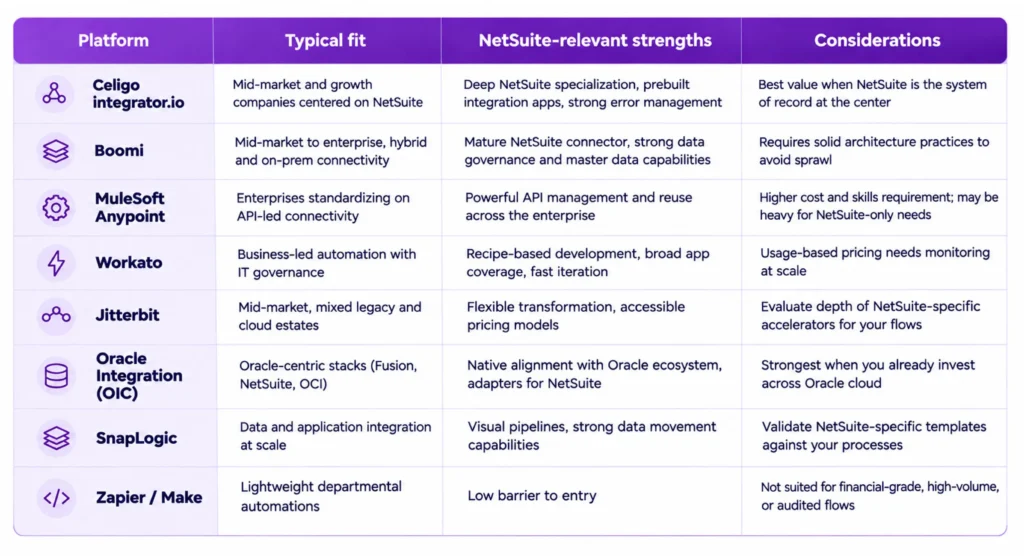
Always validate current capabilities, pricing, and NetSuite adapter details directly with vendors, as these change frequently.
7. Decision Framework: Choosing the Right NetSuite Integration Approach
Use these questions to narrow the field quickly:
- How many systems will connect to NetSuite over the next 24 months?
One or two points to connectors or APIs. Five or more points to an iPaaS.
- Is the logic standard or differentiated?
Standard order-to-cash with a mainstreameCommerce platform favors a prebuilt connector. Complex pricing, routing, or multi- entity logic favors an iPaaS plus RESTlets.
- Who will own it?
If you have no dedicated integration engineers, favor managed platforms and vendor-supported connectors over custom code.
- What are the volume and latency requirements?
High-volume or near-real-timeflows require careful concurrency planning, queuing, and idempotent design.
- What are the compliance requirements?
SOX, audit trails, and segregation of dutiesfavor platforms with logging, role-based access, and change control.
- What is the exit strategy?
Favor approaches where mappings and logic aredocumented and portable.
7.1 Common Reference Architectures
- Lean growth stack: Prebuilt connectors for eCommerce, CRM, and banking, plus an iPaaS for exceptions and new flows.
- Enterprise hub-and-spoke: iPaaS or API gateway as the central integration layer, with NetSuite exposed through governed, reusable APIs and canonical data models.
- Data-centric: Transactional flows via iPaaS, with a separate ELT pipeline replicating NetSuite data into a warehouse for analytics.
8. NetSuite Integration Best Practices
- Design for idempotency. Use external IDs so retries never create duplicate transactions.
- Sync incrementally. Filter on last-modified timestamps rather than pulling full datasets.
- Respect governance. Budget concurrency across integrations, and schedule heavy jobs outside peak transaction windows.
- Separate sandbox and production credentials. Refresh sandboxes deliberately and re-test integrations after each refresh.
- Centralize monitoring and alerting. Every integration should have an owner, an SLA, and an alert path.
- Treat integrations as code. Use SDF, version control, code review, and documented mappings.
- Plan for release cycles. Test against NetSuite preview environments before each major release.
- Secure by default. Apply least-privilege roles, rotate credentials and certificates, and restrict integration roles to only the records they need.
- Retire SOAP dependencies. Inventory legacy integrations and schedule migration to REST before deadlines force it.
9. Common Pitfalls to Avoid
- Point-to-point sprawl: Dozens of unmanaged integrations with no shared standards.
- Over-customization in connectors: Changes that break upgrade paths.
- Ignoring concurrency limits: Parallel jobs from multiple tools collide and trigger throttling.
- No error ownership: Failed records sit in queues because nobody is accountable.
- Building what you can buy: Engineering time spent rebuilding commodity flows.
- Skipping data governance: Inconsistent customer, item, and subsidiary master data propagates errors everywhere.
10. Measuring Success
Track integration performance with business-relevant metrics:
- Order-to-cash and procure-to-pay cycle time
- Integration error rate and mean time to resolution
- Percentage of transactions requiring manual intervention
- Time to onboard a new channel, entity, or acquisition
- Integration cost per transaction or per connected system
11. How iQuasar Supports Your NetSuite Integration
There is no single best answer to the NetSuite integration question, only the best fit for your scale, complexity, and operating model. Use native APIs and RESTlets for differentiated logic, prebuilt connectors for standard flows, and an iPaaS to bring governance, monitoring, and reuse to the whole landscape. Start with an inventory of your current integrations, classify them by business criticality and technical risk, and build a roadmap that retires fragile custom work first. If you are planning a NetSuite integration roadmap, begin with an architecture assessment that maps your systems, data flows, volumes, and ownership. It is the fastest way to turn integration from a recurring cost center into a durable business capability. iQuasar Software provides senior NetSuite consultants, developers, administrators, and QA specialists on hourly, part-time, full-time, or project-based engagements, typically onboarded in days rather than months. Explore the full NetSuite services offering. iQuasar lifts inventory accuracy from 81% to 99.2% through real-time NetSuite integration and cutting order processing from two to three days to under 15 minutes through process automation. Book a consultation to discuss your NetSuite integration roadmap.
13. Frequently Asked Questions About NetSuite Integration
Q1. What is NetSuite integration?
NetSuite integration is the process of connecting NetSuite ERP with other applications, such as CRM, eCommerce, banking, payroll, warehouse, and analytics systems, so data flows automatically and consistently between them. It can be achieved through APIs, prebuilt connectors, or an iPaaS platform.
Q2. What APIs does NetSuite offer?
NetSuite provides SuiteTalk REST web services (JSON, OAuth 2.0, SuiteQL), SuiteTalk SOAP web services (legacy and being phased out), and custom RESTlets built with SuiteScript. SuiteAnalytics Connect adds read-only ODBC/JDBC access for analytics.
Q3. Should I use REST or SOAP for a new NetSuite integration?
Use REST. Oracle has announced a phased deprecation of SOAP, so new projects should be built on SuiteTalk REST, and existing SOAP-based integrations should have a migration plan. Check Oracle’s current documentation for exact timelines.
Q4. What is a RESTlet in NetSuite?
A RESTlet is a custom, server-side SuiteScript endpoint that external systems can call over HTTP. It is used when you need custom logic, validation, or a tailored payload that the standard REST API does not provide.
Q5. What is the difference between a NetSuite connector and an iPaaS?
A connector is typically a purpose-built integration between NetSuite and one other system, such as Shopify or Salesforce. An iPaaS is a broader platform that hosts many integrations, provides shared monitoring and error handling, and supports custom orchestration across multiple systems.
Q6. Which iPaaS is best for NetSuite?
It depends on your environment. Celigo is often favored for NetSuite-centric mid-market stacks, Boomi and Workato for broad enterprise and business automation use cases, MuleSoft for API-led enterprise architectures, and Oracle Integration for Oracle-centric environments. Evaluate on NetSuite accelerators, total cost, governance features, and available skills.
Q7. How does NetSuite authenticate integrations?
Common methods are OAuth 2.0 and token-based authentication (TBA). OAuth 2.0 is generally recommended for new work. Always use dedicated integration roles with least- privilege permissions rather than personal user credentials.
Q8. Are there limits on NetSuite API calls?
Yes. NetSuite applies concurrency limits tied to your account’s service tier and SuiteCloud Plus licensing, and scripts are subject to governance units. Design integrations with queuing, backoff and retry logic, and incremental sync to stay within limits.
Q9. Can NetSuite integrate in real time?
Yes, with the right pattern. Real-time or near-real-time flows are commonly built with User Event scripts, workflows, RESTlets, or iPaaS triggers. For high-volume scenarios, near-real- time with queuing is often more reliable than strict synchronous calls.
Q10. How long does a NetSuite integration take?
A standard prebuilt connector can go live in weeks. Custom or multi-system integrations typically take one to several months, depending on data mapping complexity, testing, and compliance requirements.
Q11. How much does NetSuite integration cost?
Costs vary widely: connector licenses, iPaaS subscriptions (often based on endpoints, tasks, or volume), implementation services, and ongoing support. Compare total cost of ownership over three years, not just the initial build.
Q12. How do I move NetSuite data into a data warehouse?
Common options include SuiteQL via REST, SuiteAnalytics Connect, or an ELT or iPaaS tool that replicates data into Snowflake, BigQuery, or Redshift. Use incremental extraction and keep analytics workloads separate from transactional integrations.
Q13. Does iQuasar support NetSuite integrations?
Yes. iQuasar’s NetSuite integration services connect NetSuite with systems such as Salesforce, Shopify, Magento, warehouse and payment systems, and other applications. The team also builds custom SuiteScript solutions and supports NetSuite’s twice-yearly updates, including testing and fixing affected scripts. To discuss your project, talk to the team.
Need a tailored NetSuite integration recommendation? Book a free consultation with iQuasar or explore its NetSuite services to map your systems, volumes, and compliance needs against the decision framework above.